


There's a distinction between Rewards
Redemption start date and Expiry date in Webplanex Wallet. Here's a breakdown:
Navigate to Settings: Locate the "Settings" button on the navigation bar within the Webplanex Wallet app, Within the settings menu, look for a section related to "Setup Rewards Balance Expiry Time".
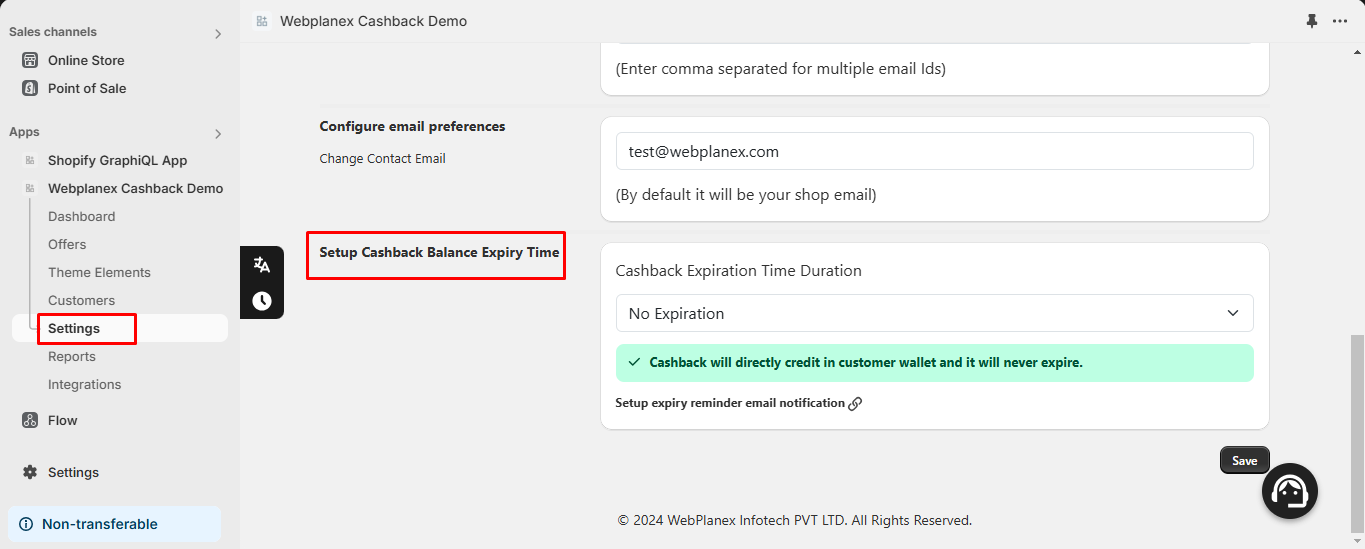
Rewards Redemption Start Date:
- You can leveragecustom date settings within the "Rewards Balance Expiry Time" section (Settings menu) to control Rewards redemption.
- By selecting "Custom Date Settings" and setting a Start Date, you essentially delay when Rewards becomes available for customer redemption.

Impact:
- Rewards earned before the Start Date won't appear in the customer's wallet and cannot be redeemed until the Start Date arrives.
- Rewards earned on or after the Start Date will be credited to the customer's wallet and become redeemable.
Rewards Expiry Date:
- This refers to the date after which the credited Rewards expires and is no longer usable by the customer.
- You define both the Start Date (when Rewards becomes available) and the Expiry Date (when it expires) for specific control.
Example Scenario:
- Let's say you set a Start Date for Rewards redemption as July 1st and an Expiry Date as December 31st of the same year.
- Customers who earn Rewards before July 1st won't see it in their wallet until July 1st.
- From July 1st onwards, any earned Rewards will be credited to the wallet and can be redeemed until December 31st. After December 31st, any unspent Rewards will expire.
Key Points:
- Custom date settings allow you to control the timeframe during which customers can redeem their earned Rewards.
- Setting a Start Date delays the availability of Rewards in customer wallets.
- The Expiry Date defines the deadline for customers to use their credited Rewards before it disappears.
Important Note:
The expiry calculations are based on Webplanex Wallet's server time. Be mindful of the time zone difference to avoid unintended expiry times.