


You can now change or add your WhatsApp number directly using the provided WhatsApp link and complete the verification from our app. Follow the steps below to activate your new or secondary number.
Step 1: Add a New Number from WhatsApp
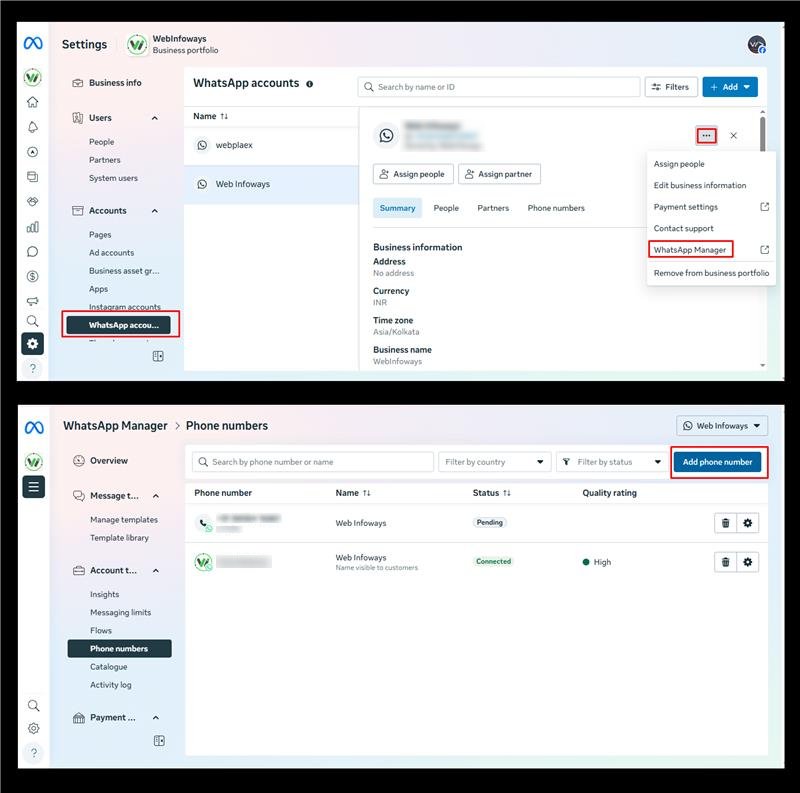
- Open WhatsApp using the provided link.WhatsApp Manager
- Go to Account → Phone Number.
- Click on Add Number.
- Enter the category name.
- Add the phone number and save it.
Step 2: Verify the Number from the App

- Open Webplanex Loyalty Wallet App.
- Navigate to Customer Notification → WhatsApp Notification → WhatsApp Phone Number.
- You will see the verification code screen.
- Click on Verify Code.

- Choose how you want to receive the code:
- Text message (SMS), or Phone call
- Enter the verification code received on your phone.
- Once the code is verified, your second WhatsApp number will be activated successfully in the app.